Showing posts with label samsung a11 frp bypass. Show all posts
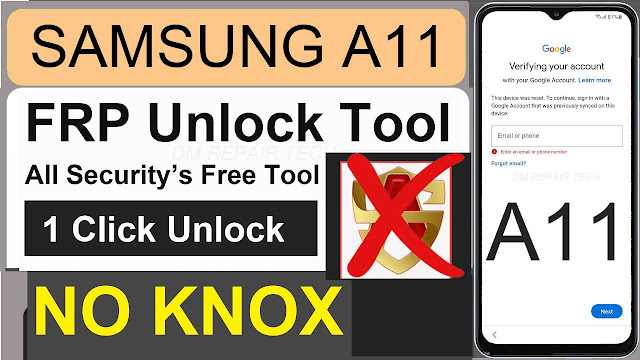
1 Click Frp Samsung A11 Frp Bypass Tool Android 11 NO Knox

1 Click Frp Samsung A11 Frp Bypass Tool Android 11 NO Knox

Google Lock Samsung A11 Frp Bypass Tool Android 11 NO Knox

Samsung A11 Frp Bypass Tool NO Alliance Shield NO Knox: FRP is an inbuilt data protection feature for all present-day Android smartphones, It protects phones from unauthorized access. After done a factory reset, If you forget the last active Gmail account which was used before on your phone, then, you have to find a solution to unlock your phone. Here, more especially, I share a post Samsung Galaxy A11 Version Android 11 Unlock Google Lock, SM-A115F, SM-A115U, SM-A115M FRP Reset Unlock with proper instructions to unlock your phone. So, follow the below how to process carefully.

FRP is automatically turned on when you sign in to a Google Account on your Samsung A11 phone. If you reset your phone without removing the Google Account, you will need to log in with the same Google ID and password that you set up on the device to bypass the Google Account Verification lock on your Galaxy A11.

In case, your device stuck at the FRP lock verification screen and you have forgotten the Gmail account information, Then these simple step-by-step instructions will help you to bypass google account lock from your device.

Bypass FRP Galaxy A11 NO Knox Google Account

The Samsung A11 FRP unlock mechanism has become very challenging in the new security’s, you can also use any compatible FRP bypass tool and FRP bypass APK according to your phone to unlock FRP, and here I am sharing the latest FRP bypass guide to bypass FRP lock from Samsung A11 your device.

More: 1 Click All SAMSUNG Frp Reset Tool DM instantly Unlock

G Remove FRP

Unlocking Service Instantly: if you looking also for Unlock Your Phones, you was trying hardly to Bypass frp. Here you can see Reviews DM Unlocker can help you and unlock your phone instantly. dmrepairtech is a best Unlocker resellers any Smartphones.

How to disable FRP (factory reset protection):

in your Samsung Galaxy A11 device, The FRP feature will automatically Enable as soon as you add a Google Account to your Samsung device. If you want to disable it, you just need to delete your account.

How to Unlock Samsung A11 Google Account Remove NO Knox

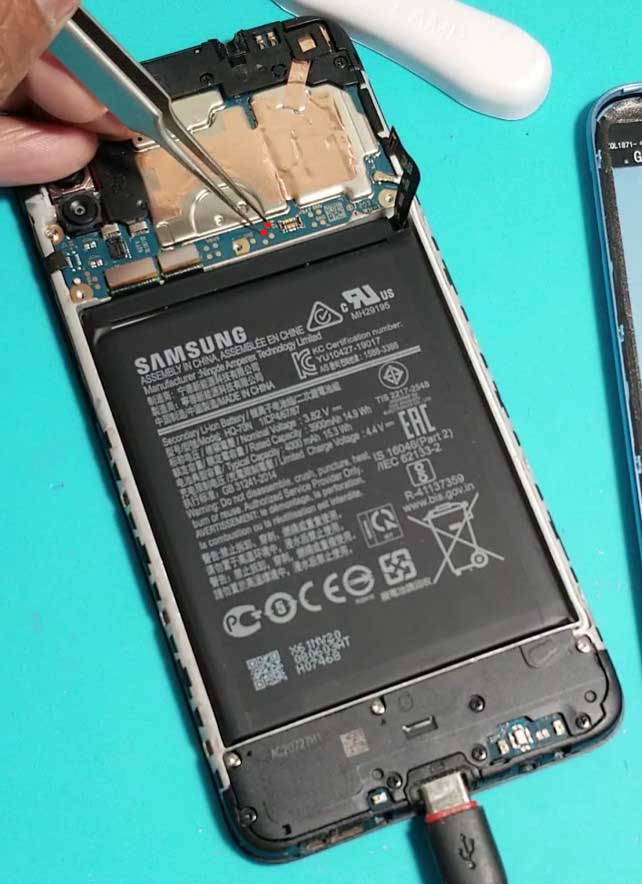
Samsung A11 test point frp
  • Tab Qualcomm > refresh > Add Loader file.
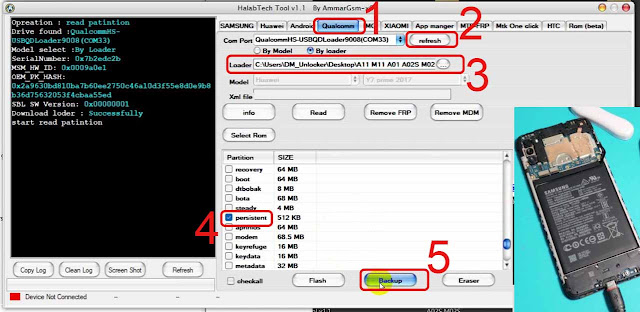
Frp Samsung A11 Frp Bypass Tool Android 11 NO Knox
Let’s start

VIDEO TUTORIAL-1

How to Bypass Frp Samsung A11 NO Knox 1 Click Free Tool


Samsung A11 FRP Bypass U2 Android 11 Downgrade Firmware

Samsung A11 FRP Bypass U2 Android 11 Downgrade Firmware

Samsung A11 Android 11 FRP Downgrade Firmware

smasung A11 Frp bypass Android 11 downdrade firmware

Google has added a security feature (FRP = Factory Reset Protection) OS 5.0 to Android 11 all devices. After factory reset process completed, FRP will ask you to verify your account this device was reset, To continue, sign in with a Google account that you was before signed on this phone. This feature is very important and will that have a security to avoid misuse of the device during as theft or lost your Device. Occasionally, at the same time, The users get into trouble when they intentionally forget their Google Account or password credentials after a hard reset.. So, in this tutorial, we have come up with the latest method of Bypass FRP Samsung A11. If you follow my simple methods you can unlock Google Lock Galaxy A11.

If your Samsung A11 Google Account locked by Android 11 new Security's patch, After looking many tutorials you can't Bypass Free tutorials because Google has blocked all method FRP Bypass. Here I will share you FRP Bypass Samsung A11 Android 11. this article can Bypass Google Account Easy method like my Tutorial.  

How to remove Google Account from Samsung Galaxy A11?

are you looking for remove google account lock Samsung A11 Android 11. So unlocking it will not be a difficult task for you if you follow the Our correct procedure method, if you can remember your Gmail account, you can easily bypass your Samsung Galaxy A70 FRP Google account, but if you forget your Gmail account to bypass FRP It will be a bit difficult.

    How To Disable Factory Reset Protection

    If you want to Remove the FRP lock feature from your Samsung then you need to delete the Gmail Account from the device Settings. follow the below how to disable the Factory Reset Protection successfully: go to the settings menu=>> Accounts=>> select the Gmail id =>> remove account =>> that’s it.

Unlocking Service: if you looking also for Unlock FRP, you was trying hardly to Bypass frp Huawei. Here dmrepairtech can help you and unlock be unlock your phone instantly. dmrepairtech is a Unlocking resellers any Smartphones.

Samsung Unlock
Huawei Unlock
Nokia Flashing
Nokia OST ID
Realme Unlock
iCloud Unlock
Xiaomi Mi Unlock

Download Samsung A11 FRP Bypass Firmware 👇 

    How to Bypass FRP Samsung Galaxy A11:

    Step 1: Enter Your Samsung Galaxy A11 to Download Mode:

    • Turn OFF your Samsung Galaxy A11.
    • Press & hold Together Home ButtonVolume Down ButtonPower Button.
    • Release all keys Once the WARNING displayed.
    • Then press the Volume up Key to Continue.
    • Connect your Samsung Galaxy A11 Phone to your Laptop.
    Step 2: Run the Odin Program.

    Step 3: Click on “BL, AP, CP, CSC” and import the Samsung Galaxy A11 FRP Firmware.

    Let’s start

    VIDEO TUTORIAL - 1

    VIDEO TUTORIAL - 2

    VIDEO TUTORIAL - 3

    VIDEO TUTORIAL - 4

    1 Click FRP Google Account Reset DM Unlocker Service
     
    Samsung A11 FRP Bypass With PC - A11 Google Lock Remove

    Samsung A11 FRP Bypass With PC - A11 Google Lock Remove

    Samsung A11 FRP Bypass Google Account Remove Without SIM Card

    Samsung A11 frp Unlock

    Google has added a security feature (FRP = Factory Reset Protection) to all Android devices. After factory reset process completed, FRP will ask you to verify your account this device was reset, To continue, sign in with a Google account that you was before signed on this phone. This feature is very important and will that have a security to avoid misuse of the device during as theft or lost your Device. Occasionally, at the same time, The users get into trouble when they intentionally forget their Google Account or password credentials after a hard reset.. So, in this tutorial, we have come up with the latest method of Bypass FRP Samsung Galaxy A11. If you follow some simple way you can unlock Google Lock Galaxy A11.

    How to remove Google Account from Samsung Galaxy A11?

    are you looking for remove google account lock Samsung A11. So unlocking it will not be a difficult task for you if you follow the Our correct procedure method, if you can remember your Gmail account, you can easily bypass your Samsung Galaxy A11 FRP Google account, but if you forget your Gmail account to bypass FRP It will be a bit difficult.

    If you are looking to bypass your Samsung A11, here you can bypass FRP unlock SM-A115F / Galaxy A11 without Computer without SIM Card. just following my method for unlock A11.

    Download Links

    More: FRP Unlock Tool DM Download Free 2022

    How to Samsung A11 FRP Unlock [New Security]
    • First, Turn on your Samsung A11
    • Connect your Samsung A11 to a Wi-Fi network
    • Download & unzip the Easy Samsung FRP Tool V1 and USB driver to your computer
    • install SAMSUNG USB Driver on your Computer
    • click on SamsungFrp2020.exe

    • click on Disable drivers Signatures then Reboots your Computer.

    • Open Now the SamsungFRP2020V1.exe tool.
    • Reconnect USB cable the Samsung phone to the computer.
    • Second Step: Click Bypass FRP.

    • Wait until finished.
    • A Driver installation popup will open, click Install Anyway.
    • Check on your phone, A Easy Firmware popup window will appears.
    • Click on View.
    • Now you can access the Chrome Browser.
    • Type or visit the below link:
      • frp bypass app dm
    • Go to the FRP bypass APK section
    • Select Open Google Search => Open
    • Now Search for Galaxy Store
    • Select & Open Galaxy Store
      • If Galaxy Store needs Update, Tap on Update
      • Then follow the above process again
    • Now Samsung Galaxy Store will open
    • Tap on the Search icon and type: Google Play Services hidden Settings
    • Sign in with Samsung Account
    • Wait until the installation process completed =>> Click Open
    • Now Click “Google Play Services (WebpageOnbodyPermission)”
    • It will open you to the Pattern/Pin/password lock setup screen
    • Protect your phone =>> PIN =>> PIN 1234 and confirm it =>> Tap Skip
    • Don’t Reboot your Samsung A11
    • Go Back to Welcome Screen by tapping on the back key multiple times
    • Setup all the initial steps
    • Enter PIN 1234 lock that you set up earlier
    • Tap Skip on the Google Account Sign-In page.
    • Finally, Galaxy A11 Unlocked

    Let’s start

    VIDEO TUTORIAL - 1

    VIDEO TUTORIAL - 2

    VIDEO TUTORIAL - 2

    VIDEO TUTORIAL - 3

    VIDEO TUTORIAL - 4

    1 Click FRP Google Account Reset DM Unlocker Service