Showing posts with label frp bypass samsung. Show all posts
Samsung FRP Bypass 2025 Latest with Downgrade Firmware

Samsung FRP Bypass 2025 Latest with Downgrade Firmware

samsung frp bypass latest with downgrade firmware


# Topic Summary
1 What is Samsung Binary Bit? Explains Samsung firmware bootloader/binary (U1, U2…U9) and why downgrade fails.
2 How to Check Binary Bit (SW) Check via build number, download mode, or professional tools.
3 How to Downgrade Firmware Step-by-step guide to downgrade safely using Odin.
4 Where to Download Downgrade Firmware SamFW, Frija, SamMobile, or DM Unlocker server.

What’s Samsung Binary Bit?


Samsung firmware comes with a Bootloader version, also called Binary Bit.

 • Binary Bit is shown as a number in the firmware build.

 • Example: A146BXXU7CXA2 → Binary = 7.

 • You cannot downgrade to a firmware with a lower Binary.

 • If your phone is Binary 7, you cannot flash Binary 6.

 • But you can flash Binary 7 or higher.


👉 In short: Binary = Firmware lock number that controls downgrade compatibility.

How to Check Binary Bit SW

There are different ways to check your Samsung Binary Bit:

 1. From Software Info (Settings):

 • Go to Settings > About Phone > Software Information.

 • Look at the Build Number. Example: A105FXXU6BVG2 → Binary 6.

 2. From Download Mode:

 • Turn off device → Press Vol Up + Vol Down + USB cable.

 • Check Bootloader Version (BL). Example: BL = U7 → Binary 7.

 3. Using Tools:

 • Free Tools (SamFw Tool.) also show Binary automatically.

🔧 Our Services

We provide professional unlock solutions, tool activations, and credit refills for all major brands:

  • Samsung Unlock & FRP Bypass
  • iPhone Unlock & iCloud Activation Lock Removal
  • Xiaomi / Nokia Unlock Services
  • Moto / Pixel Google Lock Removal
  • Tecno & Infinix FRP Unlock
  • 🔑 Tool Activation, Renewals & Credits Refill

📞 Need Help? Chat with us:

💬 WhatsApp 📢 Telegram

Need help? Chat with us on WhatsApp: +8801747113074


How to Downgrade Samsung Firmware for FRP Bypass


To bypass FRP lock using firmware downgrade:

 1. Check the current Binary (example: Binary 7).

 2. Find downgrade firmware with the same or higher Binary.

 • Example: Device on Binary 7 → You must flash Binary 7 firmware (older build date).

 3. Download the firmware package (BL, AP, CP, CSC).

 4. Put your device in Download Mode.

 5. Use Odin Tool to flash the firmware.

 6. Once downgraded, apply your FRP bypass method (USB redirect / IMEI Service / Test Point).


⚠️ Note: If you try to flash a lower Binary, Odin will fail and device won’t downgrade.


Where to Download Suitable Downgrade Firmware


You can download Samsung firmware from:

 • SamFW.com (Free firmware download)

 • SamMobile.com (Official Samsung firmware library)

 • Frija Tool (PC tool for direct Samsung server download)

 • DM Repair Tech Server (if you provide firmware to your users)

👉 Always choose the same model number + same region + correct Binary to avoid errors.


🏆 Final Words


Samsung FRP bypass with downgrade firmware is only possible if you carefully check the Binary Bit. Once you know your Binary version, download the correct firmware and flash with Odin. This method works perfectly on Samsung Android 15 devices.


❓ FAQ


Q1: Can I downgrade to any firmware version?

👉 No. You must downgrade only within the same Binary Bit.


Q2: What happens if I flash lower Binary?

👉 Odin will fail, and firmware won’t install.


Q3: Is FRP bypass with downgrade safe?

👉 Yes, if you use the correct firmware and official tools.


Q4: Where is the easiest place to get firmware?

👉 SamFW or Frija Tool for free.

FRP Samsung Galaxy Tab S8 SM-X700 FRP Bypass Android 13

FRP Samsung Galaxy Tab S8 SM-X700 FRP Bypass Android 13

bypass frp lock on Samsung galaxy Tab S8 google lock, follow these simple steps: first, connect your device to wi-fi. Next, follow the on-screen instructions to access the keyboard.

Enter some random text and select it. Finally, choose the share option and then select email. This will take you to the Gmail app where you can add an existing email account or create a new one to complete the bypass process.

Samsung galaxy tab S8 is a popular tablet with several features. However, it can become a headache when you forget your google account credentials or encounter frp lock issues. The factory reset protection (frp) lock is a security measure that blocks unauthorized access to your device. If you're stuck with this issue, this guide will help you bypass the frp lock on your Samsung galaxy tab a7 lite google lock using simple steps. Just follow the instructions mentioned above carefully to get past the frp lock and access your device again.

Samsung Galaxy Tab S8 SM-X700 FRP Bypass Android 13

Understanding Frp Lock on Samsung Galaxy Tab S8

Samsung frp lock is an essential security feature that prevents unauthorized users from accessing your device. Frp, or factory reset protection, is a security protocol that ensures your Samsung galaxy tab S8 remains locked in the event of a factory reset.

In essence, frp lock helps protect your device from theft and unauthorized access, making it an essential feature. The frp lock is enabled on the Samsung galaxy tab SM-X700 to keep your device secure and protect your personal data.

Some of the key features of Samsung frp lock include device location tracking and remote wipe. By adhering to these guidelines, you can bypass frp lock on your Samsung galaxy tab S8 and enjoy an uninterrupted user experience.

Preparing Your Device For Frp Bypassing

To bypass the frp lock on Samsung galaxy tab S8, you need to prepare your device carefully. Unlocking the frp lock is crucial, as it can prevent unauthorized access to your device. However, the process requires adequate knowledge and special tools that must be handled with care.

One important thing to keep in mind is to be mindful of the procedure while bypassing the frp lock on samsung galaxy tab S8. Tools such as a pc, an otg cable, and a frp bypass app are required for a successful frp bypass.

Before proceeding, it is best to prepare your device by backing up your data, charging your device, and connecting it to a stable internet connection. Taking these precautions can reduce the risk of losing data or damaging your device during the frp bypassing process.

- Model: SM-X700
- Baseband: X700XXU3BWC1
- Software: X700XXU3BWC1
- Sales Code: XAR
- Country: US
- SN: R52TC03A....
- IMEI: NONE
- UN: CE07226735025C2F1D7E
- Software REV: BIT[3] 
- Software Build Date: 2023-03-01
- Checking device lock: TRIGGERED
- Checking FRP service: [ON] 

How to Bypass FRP Galaxy Tab S8 Android 13

Before you start with this process you need to fulfill all the prerequisite criteria to unlock FRP Samsung.

  • Your device must have 20-60% of the battery charge before performing the FRP process.
  • Download Link: USB Redirector DM = USBv9.7
  • Most important follow the below guide properly.

Get Premium Service DM Unlocker Assistant Instantly⬇

📩 Direct Inbox: m.me/DMRepairTech
☎️ WhatsApp Direct Chat👉: Click Here

dm repair tech frp dm Unlocker Assistant

    How to Bypass Google Verification on Tab S8 SM-X700

    DM Unlocker Download

    If all free Unlock method does not work in your case, unfortunately, you are left with only option of doing Unlock on your Samsung Android 13. To do this, follow these steps I will write Friendly article to help you.

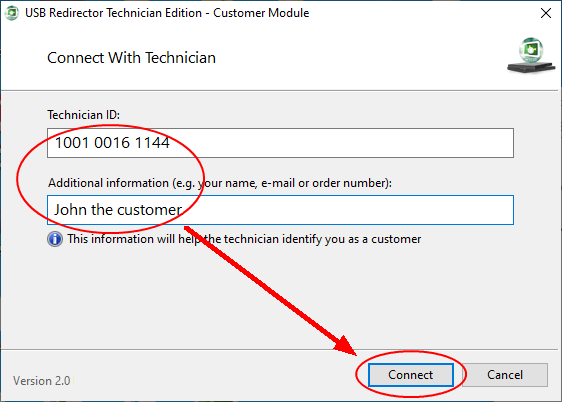
    Step 1: Download and Open USB Redirector on Your Computer: Link Here
    samsung galaxy tab s8 sm-x700 frp bypass

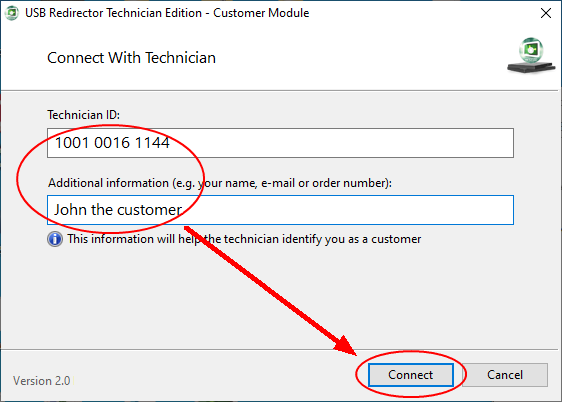
    Step 2: Type Technician ID: 1041 6506 XXX Get ID my: Contact US.

    Step 3: Type your any desired name on Additional Place (then tell me) > Connect.

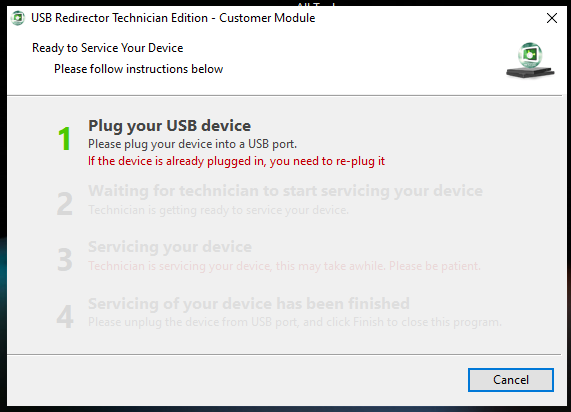
    Step 4: Turn on device Reconnect USB Cable for step 2 …

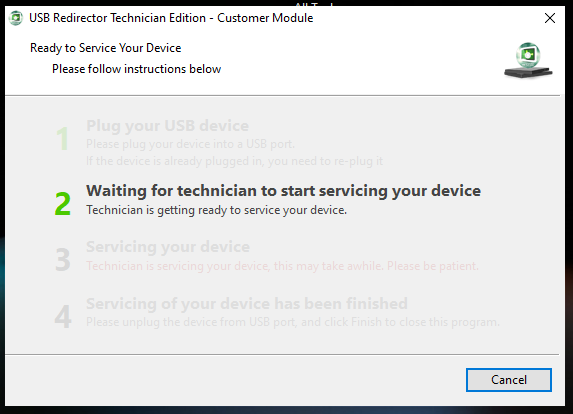
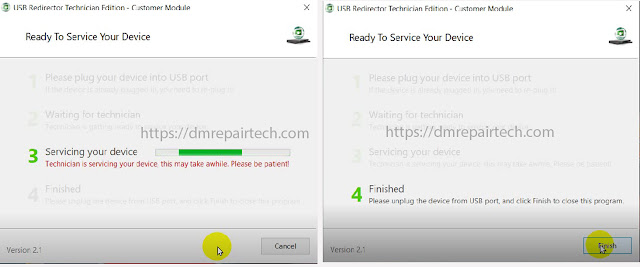
    Step 5: When 3 Servicing your device to going step 4 Finished.

    Step 6: Finally, Your Tablet SM-X700 FRP/Google Account Removed by DM Unlocker.

    Let’s start.

    VIDEO TUTORIAL-1


    Method-2: Bypassing Frp Lock on Samsung Galaxy Tab S8

    SAMSUNG TAB S8 Frp Unlock Tool Download

    File Name: Samsung UnlockTool.Exe
    File Size: 7MB
    Type: Exe
    Download: Here [PASS: DMREPAIRTECH.COM]

    unlock tool frp bypass tool dm repair tech

    It can be frustrating to get locked out of your Samsung galaxy tab S8 due to the frp lock. Luckily, there are various ways to bypass this security measure. One popular method is using an frp tool. However, this can be risky and may void your warranty.

    Another way is using a sim card. While this may seem like an easy fix, it won't work if you're not using a compatible carrier. The safest way to bypass frp lock is by factory resetting your device. Just make sure to backup your data first.

    Lastly, be aware of common mistakes like using the wrong firmware version or making incorrect selections during the bypass process. By following our step-by-step guide, you'll be able to bypass frp lock on your samsung galaxy tab S8 without any issues.

    Frequently Asked Questions for How to Bypass Frp Lock on Samsung Galaxy Tab S8 Google Lock

    What Is Frp Lock on Samsung Galaxy Tab S8?

    Frp lock stands for factory reset protection which is an in-built security feature for Samsung devices.

    Why Do I Need To Bypass The Frp Lock On My Device?

    You need to bypass the frp lock on your device if you forget your google account details or if you bought a second-hand device that is google locked.

    How Do I Bypass the Frp Lock on Samsung Galaxy Tab S8?

    You can bypass the frp lock on Samsung galaxy tab a7 lite by using the combination file or by using an frp removal tool.

    Can I Bypass The Frp Lock On My Own?

    Yes, you can bypass the frp lock on samsung galaxy tab a7 lite on your own by following the step-by-step guide or tutorial.

    Is It Legal To Bypass The Frp Lock On Samsung Galaxy Tab S8?

    It is legal to bypass the frp lock on your samsung galaxy tab S8 as long as you are the rightful owner of the device or have permission to do so from the owner.

    Conclusion

    Now that you know how to bypass frp lock on samsung galaxy tab S8, your device is guaranteed to be fully functional again. It's important to remember that frp lock is a security feature, and samsung implemented it to protect its users from unauthorized access.

    However, it can be a hassle when you forget your login credentials. Luckily, the methods we discussed in this article are effective and easy to follow. Remember to back up your data before resetting your device, and always use caution when downloading third-party software.

    By following the steps outlined in this article, you'll be able to bypass frp lock and regain access to your Samsung galaxy tab S8 without any issues.


    FRP Unlock Samsung A14 5G A146B FRP Bypass Android 13

    FRP Unlock Samsung A14 5G A146B FRP Bypass Android 13

    Samsung Galaxy A14 5G Google Account Remove: FRP is an inbuilt data protection feature for all present-day Android smartphones, it protects phones from unauthorized access. After done a factory reset, if you forget the last active Gmail account which was used before on your phone, then, you have to find a solution to unlock your phone. Here, more especially, I share a post how to Bypass FRP Samsung Galaxy A14 5g Version Android 13 Unlock Google Lock, SM-A146B, SM-A146P, SM-A146U FRP Reset Unlock with proper instructions to unlock your phone. So, follow the below how to process carefully.

    samsung galaxy a14 5g a146b frp bypass android 13

    Bypass FRP Samsung A14 5G SM-146B Google Account Lock

    Samsung device A14 5G were built with or updated to Android 13. And when you have done factory reset your phone, you need the Google account verification before you signed it. But what if you forget the password Or Gmail, if you have Questions, is it possible to bypass Google account lock on Samsung A146B? The answer is yes. You can remove FRP Samsung Android 13 with the following the Two methods.

     Contact DM Unlocker: 

    📩 Direct Inbox: m.me/DMRepairTech
    ☎️ WhatsApp Direct Chat👉: Click Here

      How To Disable Factory Reset Protection

      If you want to Remove the FRP lock feature from your Samsung, then you need to delete the Gmail Account from the device Settings. follow the below how to disable the Factory Reset Protection successfully: go to the settings menu=>> Accounts=>> select the Gmail id =>> remove account =>> that’s it.

      Easy 2 Methods: Frp Unlock Samsung A14 5G On Android 13?

    How to Bypass Google Verification on SAMSUNG A14 5G

    If all free Unlock method does not work in your case, unfortunately, you are left with only option of doing Unlock on your Samsung A14 5G SM-A146U. To do this, follow these steps I will write Friendly article to help you.

    Step 1: Download and install > ST MTK Universal & Chimera Tool.

    Step 2: Register Chimera Tool by your Email and Username.

    Step 3: Login Chimera Tool.

    Step 4: Turn Off your Samsung A14 5G > Connect USB Cable.

    samsung galaxy a14 5g google account bypass

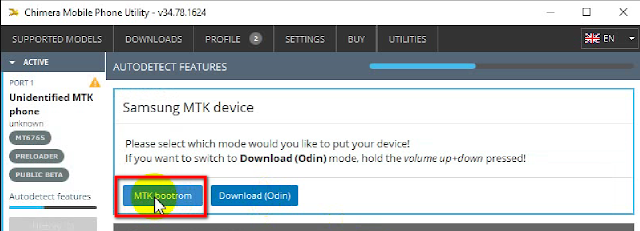
    Step 5: Hit MTK bootrom > if reading data from phone. 

    Step 6: You will see Device Name on Chimera.

    samsung a14 frp tool chimera tool

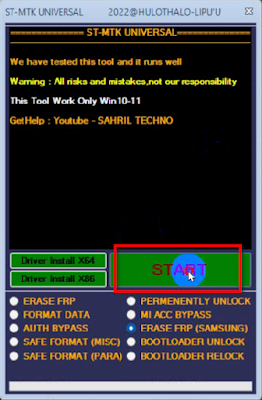
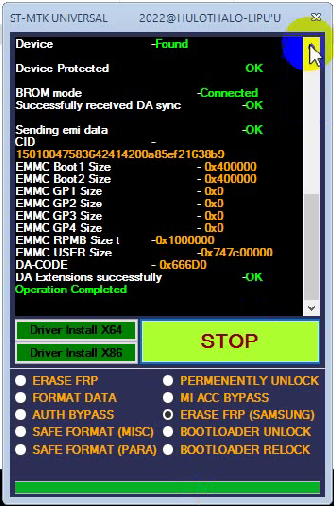
    Step 7: Open ST MTK Universal Tool > Erase FRP (SAMSUNG) > Start.

    st mtk universal frp tool

    Step 8: Close Chimera Tool 
    • You will see ST-MTK Universal Tool will be done Operation Completed.

    st mtk universal frp tool

    Step 9: Finally, Galaxy A14 5G FRP Unlock done.

    SAMSUNG A14 5G Frp Unlock Chimera TOOL

    File Name: Samsung A14 Frp Unlock Tool.zip
    File Size: 57MB
    Type: Zip
    Download: ST MTK Universal Tool [PASS: DMREPAIRTECH.COM]
    Download: Chimera Tool

    Let’s start:

    VIDEO TUTORIAL-1

    How to Remove Google Account on Samsung A14 5G 

    How to Bypass FRP Galaxy A14 5G SM-A146U Android 13

    1- Open USB Redirector Download Link - 1 = USB V9.7 then open Next.

    2- Get Remote technical ID > Contact DM Unlocker Assistant:

    • Put Technician ID > Additional place: Put Any name.

    dm unlocker download

    3- Turn ON A14 5G Phone > Reconnect USB Cable.

    USB Redirector Samsung FRP Tool

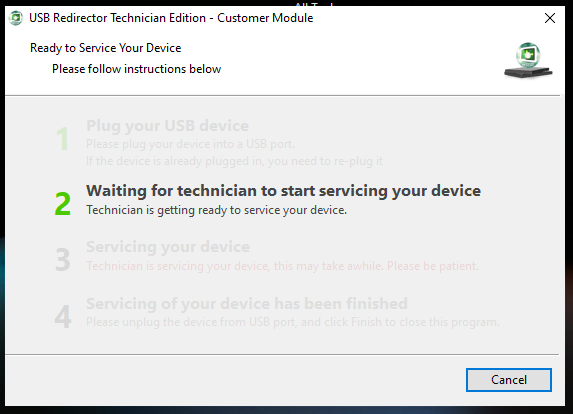
    4- you will see 2 Waiting for technician to start servicing your device.

    USB Redirector Samsung FRP Tool

    5- When 3 Servicing your device to going step 4 Finished.


    Finally, Your Samsung A14 5G Google Account Removed by DM Unlocker.

    All Samsung 1 Click Google Lock Reset Remote Service