Showing posts with label Hardware. Show all posts
Huawei P20 Lite (ANE - LX1) NO Service emergency call only NO Service Fix

Huawei P20 Lite (ANE - LX1) NO Service emergency call only NO Service Fix

Huawei P20 lite NO Service emergency call only 

Huawei P20 lite emergency calls only no service Solution after water damage

I got a Huawei P20 Lite NO service emergency call only the owner treatment phone was water damaged then he was going one repair shop after one week they returned back her phone and say this phone was not possible to fix this Huawei P20 lite. When I open phone I looked someone try to fixing it.

I checking all network sections IC all are reading normal mode. Network antenna and FR PF IC is reading normal. I was also looked at my lot of time then he has one same boat I remove charging Flex board when I put in this one working signal no service fix it like a magic is my first logic and I’m sure if you are looking same problem you couldn’t find any solution if you were looking this my post here your fix your Huawei p20 lite like my process. 

how to fix no service on huawei p20 lite?

change only Charging Flux board its working 

how to fix no service on huawei p20 lit


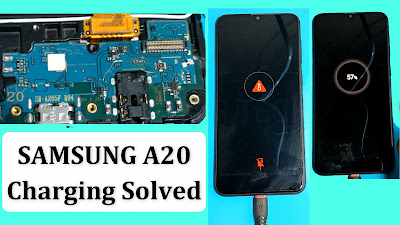
SAMSUNG A20 Charging paused battery temperature too low Fix

SAMSUNG A20 Charging paused battery temperature too low Fix

SAMSUNG A20 Charging paused battery temperature too low Fix

SAMSUNG A20 Not Charging Problem paused battery

Samsung A20 charging paused problems is a most common problem and this is mainly because of the fact that a little bit of water damage to the charging connector pin is enough to trouble with phone’s charging connector. 
Here I will Showing How to Fixing Samsung Galaxy A20 Won’t Change, after connect charger Phone screen say Charging temperature too high. If you got any Samsung A20 same issues not charging you can fixing simply. Sometimes After water damaged you look same problem.

1st check by meter after connect charger VCC (Battery Connector) How much DC Voltage passing. when Charger USB cable charging output voltage 4.5 or 5V its mean your Device charger regulator IC is good, if less  then output Battery Voltage

How to fix Samsung a20 charging problem solution

  • Connect charger check Battery + Point Output Charging voltage 4.5 or Less. My Samsung A20 output voltage 3v. 
  • Make jumper wire this point to this point. 
  • After wire jumper done now output voltage 4.6 or 5 it’s mean now Charging normally without any error.

Watching my tutorials for more help:-


Samsung a10s charging problem restart when charging fixed

Samsung a10s charging problem restart when charging fixed

Samsung A10 not charging solution

samsung a10s charging problem no power

If your phone A10s won't charge it can be extremely frustrating. Fortunately, there are some troubleshooting steps you can try to help resolve the issue without having to send your phone in for a service. The reasons for a device after water damaged or hardly poll down sometime after repair phone you look this problem

If your Samsung a10s no power not charging after repair and hardly poll down. I was changed changing DC port but success. When I showed connect charger only charging icon showed. 

Samsung A10s Charging issue for VCC BSI Line


For more watch my Tutorials 


Samsung i9060/i9060i fake charging 100% Tested

Samsung i9060/i9060i fake charging 100% Tested

Samsung I9060i fake charging/Down Bettery charging Done
Only change Usb charging SM5701 ic


The way to charge the Samsung GT-I9060 is to solve the jumper problem

Here is the Samsung Grand Neo i9060 solution for the problem of not charging on the USB pin connector. The phone is wet damaged while the wall charger is plugged in and can help if there is no indication of charging.

The cause of the problem
Phone water can be damaged.
Dust particles may be present in the charge connector.
Your Samsung i9060 charger may be malicious.
The connection to the phone may be broken.
The phone suffered no physical damage.
Any of the capacitors may be faulty.
Charging the IC may be faulty.

Before proceeding, make sure the battery and battery charger are in good working condition.
- Check all the components shown in the image below, you can start by checking the USB pin connector.
- Then fuse, diode, capacitor and filter coil for possible open or short circuit.
- Identify the path to each connection line that is directly connected to the USB pin

Just change IC SM5701 i am tested many phone Samsung Galaxy Grand Neo